Every clip account.
One hub.
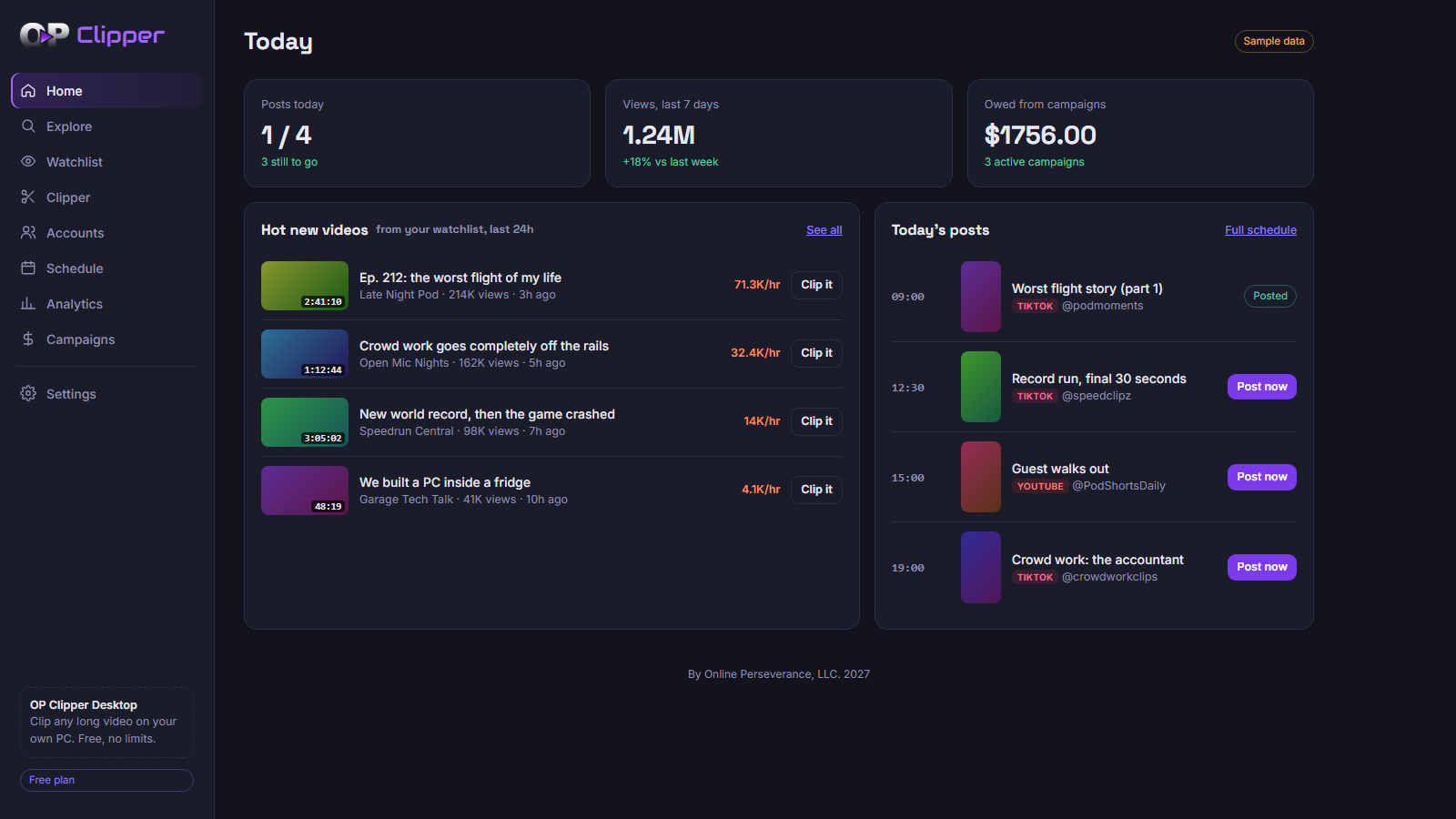
OP Clipper is home base for clippers. Spot hot new videos from the channels you track, clip them, schedule posts across all your accounts, and see what your campaigns owe you.
How it works
Track
Add the channels you clip. New uploads land in your Watchlist with views per hour, so the outliers jump out.
Clip
Clip with OP Clipper Desktop's AI Clip Scan, or bring in clips you made anywhere else.
Schedule
Plan posts across every account on one calendar. At post time you get the clip and caption, ready to go.
Get paid
See views per clip, per account and per source channel, plus what each clipping campaign owes you.
Built for clippers
Unlimited accounts
Pro runs as many clip pages as you want, grouped by niche. One price, no paying per account.
In your browser
Nothing to install for the hub. Open it on any computer.
Free desktop clipper
OP Clipper Desktop cuts long videos on your own PC: AI scan, face-tracking 9:16 crop, word-by-word captions. No per-minute credits.
Use any clipper
Already clip somewhere else? Import those clips and schedule them here.
Pricing
Free
- Dashboard access
- 2 accounts managed
- 3 AI Clip Scans a month
- 5 channel watchlist
- 5 scheduled posts
- OPC Desktop app available
Pro Release Offer -25%
- Full dashboard access
- Unlimited accounts
- Unlimited AI Clip Scans
- Unlimited channel watchlist
- Unlimited scheduling and posting
- Full analytics tracking
- Full paid campaign tracking
- Everything in Free
Release Offer for the first 1,000 sign-ups, price locked in for your first year. Then $12/mo or $120/yr. Cancel anytime.
FAQ
Why is clipping in a desktop app?
Downloading and cutting long videos is heavy work. On a cloud server it costs money for every video, which is why other tools ration credits. On your own PC the cutting is free and private, with no per-minute credits. That's how we keep OP Clipper cheap.
Which platforms can I post to?
You can schedule for TikTok, YouTube and Instagram from day one. At post time you get a reminder with the clip and caption ready. Auto-posting turns on for each platform as it's approved.
Mac?
The hub works on any computer. OP Clipper Desktop is Windows only for now.
Desktop: Windows says "not commonly downloaded" or "Windows protected your PC"?
That's normal for new apps from a new publisher. In the browser, choose "Keep". On the blue screen, click "More info" then "Run anyway". We're getting the app code-signed so this goes away.
Desktop: my antivirus flagged it?
Some antivirus apps are wary of any new, unsigned app. Only download OP Clipper from opclipper.app or our official page at github.com/OP-LLC/op-clipper-releases. If you got it anywhere else, delete it.
Who owns the clips?
You do. Make sure you have the rights to what you clip and post. See the Terms.